


CMAT Login 2026 helps aspirants recover their forgotten passwords easily. This guide also explains how to retrieve the CMAT application number using simple steps, along with key login instructions to avoid common errors.
- How to Create CMAT 2026 Login ID for Registration?
- How to Recover Your CMAT 2026 Password?
- How to Recover Your CMAT 2026 Application Number?
- What You Need to Recover Your CMAT 2026 Login Password?
- Importance of CMAT Login 2026 Password and Application Number
- CMAT Login to Download Admit Card 2026
- CMAT Login 2026 to Download CMAT Result/Scorecard
- Faqs

CMAT Login 2026 is generated once you complete the registration process conducted by the National Testing Agency for the entrance test. The login details, often referred to as the user ID, are essential as they are required for signing into the CMAT portal and managing all exam-related activities. From filling and submitting the CMAT 2026 application form to paying fees and accessing important documents, every step needs to be completed through this login dashboard.
After registration, the login credentials are shared via the registered email ID, usually containing the application number and password. These details remain crucial even after form submission. You will need the CMAT Login ID for downloading the CMAT 2026 admit card , checking the answer key, viewing results, and completing post-exam processes. Losing or misplacing them can delay key actions later. In case you have lost your CMAT Login 2026, you can check out this article to understand how to retrieve the forgotten password or application number to have a smooth and stress-free admission journey.
Also Read:
| How Many Questions to Attempt for 99 Percentile in CMAT 2026? | How Many Questions to Attempt for 100 Percentile in CMAT 2026? |
|---|
How to Create CMAT 2026 Login ID for Registration?
The applicants have to log in to the CMAT 2026 official website, follow the instructions, and enter their personal information in the window that says "New Registration" to create a CMAT login ID. The details that must be provided for creating the CMAT login include:
- Name of the exam taker
- Father’s Name
- Mother’s Name
- Date of Birth
- Category
- Gender
- Religion (may be asked)
- Physical Disability (if any)
- E-mail ID
- Aadhaar Number (may be required)
- Mobile Number
- Password Recovery Question and Answer (option may be there)
The easy step-by-step process is as follows for registration on the CMAT portal 2026:
- Step 1: Access the Official CMAT Website: To open the official website of CMAT 2026, ensure you use a secure browser such as Chrome or Firefox, which will ease the access and experience of visiting the site.
- Step 2: Choose 'Register' or 'New User': Find the 'Register' or 'New User' button on the home page. Click it to start your registration process.
- Step 3: Enter Your Details: You will be presented with the registration form. Fill it in with all your personal details such as your name, date of birth, email address, and mobile number. Make sure to double-check everything to avoid errors.
- Step 4: Generate Your Login Details: After you have filled out the form, you will receive your application number for CMAT 2026. Generate a strong password to secure your account.
- Step 5: Confirm Your Email and Mobile Number: Look for an email and SMS from CMAT containing a verification link or code. Open it and follow the steps to verify your email address and phone number.
- Step 6: Accept the Terms: Review the terms and conditions. Accept by checking the box and clicking "Continue" or "Submit".
- Step 7: Submit Your Registration: Click on the 'Register' or 'Submit' button to complete your registration. The confirmation message will be displayed for your confirmation of the completion of your CMAT 2026 registration.
- Step 8: Log In to Your Account: You will log in using your application number and password to the CMAT account. Further details you will fill in, upload the required documents, pay fees and complete your application.
How to Recover Your CMAT 2026 Password?
You can follow the steps provided below to retrieve your password for the CMAT 2026 login:
- Step 1: The first step to recovering your password for CMAT login 2026 is to visit the official website of CMAT (exams.nta.ac.in/CMAT/).
- Step 2 : Go to the CMAT 2026 login page.
- Step 3: Click on the” forgot password” button provided on the CMAT login page. Upon clicking, you will be redirected to a page containing three options to reset your password.
- Step 4: Choose any one of the three options available (Using a security question and security answer or using a reset link or using a verification code via SMS)
- Step 5: The password reset link and instructions will then be sent to the email address provided by you
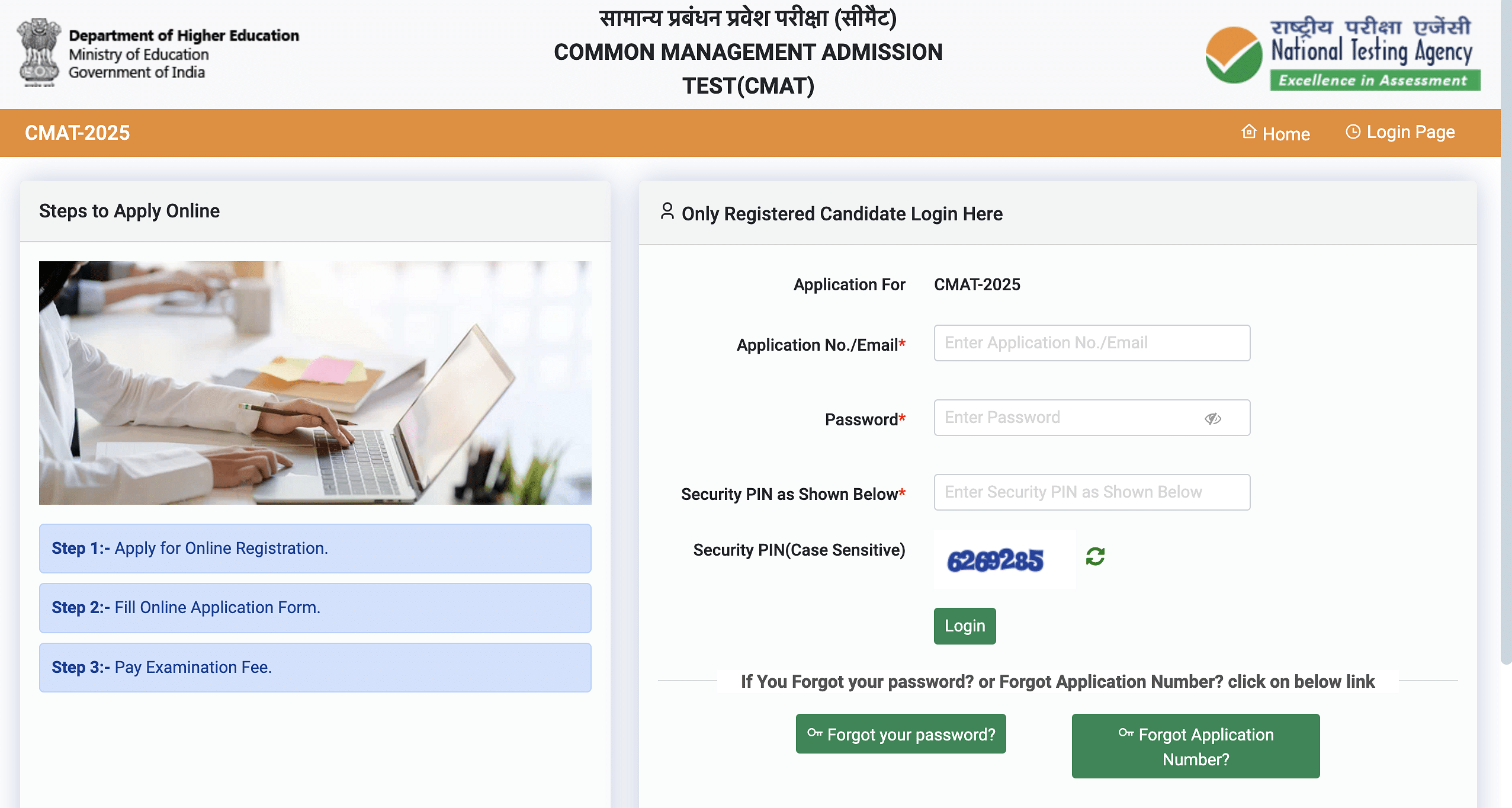
How to Recover Your CMAT 2026 Application Number?
If you have forgotten your CMAT 2026 application number, you can follow the steps provided below to find the application number.
- Step 1: Click on the “forgot application no” provided on the web page.
- Step 2: Fill in all the fields provided there including Candidate Name, Father Name, Date of Birth, and Security Pin.
- Step 3: Click on the “Get Application Number” button.
- Step 4: The application number will be sent to your email address.
What You Need to Recover Your CMAT 2026 Login Password?
All the things that you will need to recover your password for CMAT login 2026 are provided below.
A good internet connection
The email address provided by you during the application process
The mobile number provided by you during registration
Also Read : Documents Required to Fill CMAT 2026 Application Form
Importance of CMAT Login 2026 Password and Application Number
The CMAT 2026 login details are required for the following:
- Filling out the CMAT 2026 application form
- Application Form Correction for CMAT 2026
- Downloading the CMAT admit card 2026
- Downloading the CMAT City Slip 2026
- Viewing the CMAT answer key 2026
- Viewing CMAT result 2026
CMAT Login to Download Admit Card 2026
Candidates are required to follow the CMAT login 2026 steps mentioned below to download the admit card 2026:
Step 1: Go to the CMAT official websiteStep 2: Click on the link that says ‘CMAT 2026 Admit Card’.
Step 3: You will be redirected to a new window where you are required to enter the following details:
- Application Number
- Date of Birth
- Security Pin/ Captcha/ Security Code
Step 5: Check the details provided on the CMAT admit card 2026 for any errors, download the admit card in PDF format and take a printout of the same for future reference.
CMAT Login 2026 to Download CMAT Result/Scorecard
To download your CMAT 2026 result and scorecard, you first need to log in to the CMAT portal. Follow these straightforward steps to download your results and ensure that you are equipped for the next steps:
- Step 1: Official Website: Open a reliable web browser and navigate to the CMAT 2026 official website. Be sure to have a stable internet connection to avoid any glitches or errors.
- Step 2: Log in to Your Account: Once you land on the home page, you will find the login section. You will enter your credentials there, including the registered email address and password, to access your account.
- Step 3: Result Section: After logging in, look for the section that says "Result" or "Scorecard." Here, you can find your details about the CMAT 2026 exam.
- Step 4: Verify Your Details: Review the information displayed. Ensure that all your scores, percentiles, and other details are correct and reflect your performance in the exam.
- Step 5: Download the Scorecard: Click on the download button or link to save your result and scorecard to your device. The file will be mostly in PDF format for easy access.
- Step 6: Print a Copy: Print a few copies of your scorecard. Ensure the print quality is clear, as these documents might be needed at the time of admission to an MBA program.
- Step 7: Keep It Safe: Store your result and scorecard in a safe place. These documents will be required at the time of counselling, seat allocation, and other admission-related activities.
Candidates can also check out the articles below to learn more about the CMAT exam 2026!
Related Articles:
CAT vs CMAT, NMAT, XAT, SNAP, IIFT & Other MBA Entrance Exams |
Aspirants are advised to ask questions on the Q&A zone of Collegedekho in case they have any questions regarding the application form filling CMAT, or CMAT login 2026. For admission-related guidance, fill out our Common Application Form or call our helpline number 1800-572-9877.
FAQs
CMAT Login 2026 is the unique user ID generated after successfully registering for the entrance test. The details are required to complete the application process, pay fees, access the admit card, check answer key and results, and any other key exam-related services on the CMAT portal.
You can create the CMAT login 2026 ID by registering on the official CMAT website using personal details such as name, date of birth, email ID, and mobile number. After submission of the particulars, the application number and password are sent to the registered email address.
If you forget the CMAT Login 2026 password, you can recover it by clicking on the “Forgot Password” option on the login page. Once you hit the link, the reset link or security question method or SMS verification method allows you to regain access using registered email or mobile details.
To retrieve the CMAT Login 2026 application number, applicants must select the “Forgot Application Number” option on the portal. After entering required details like name, date of birth, and security pin, the application number is sent to the registered email ID.
Yes, you will require the CMAT login 2026 even after the exam is over to check the answer key, results, or any futher reference. Keeping login credentials safe helps avoid delays during MBA admissions and document verification stages.















Similar Articles
Is BITS Pilani MBA Worth It? Average Package of 2025 Explained
Is Christ University MBA Worth It in 2026? Placements Tell the Story
Your Guide to Cracking KMAT Kerala 2026 in First Attempt
KMAT Kerala 2026 Time Management Tips for 180 Questions in 150 Minutes
List of MBA Colleges Accepting KMAT Kerala 2026 Rank/ Score - Fees, Courses
KMAT Kerala 2026 Predicted Question Paper & Important Topics